Free Open source · for macOS

Tasks, notes and goals. One calm window.

Notes & Goals keeps what you're doing, writing and working toward as plain files in a folder you choose. No accounts, no cloud, and no daily page to copy forward.

Universal · Apple Silicon & Intel · macOS 12+

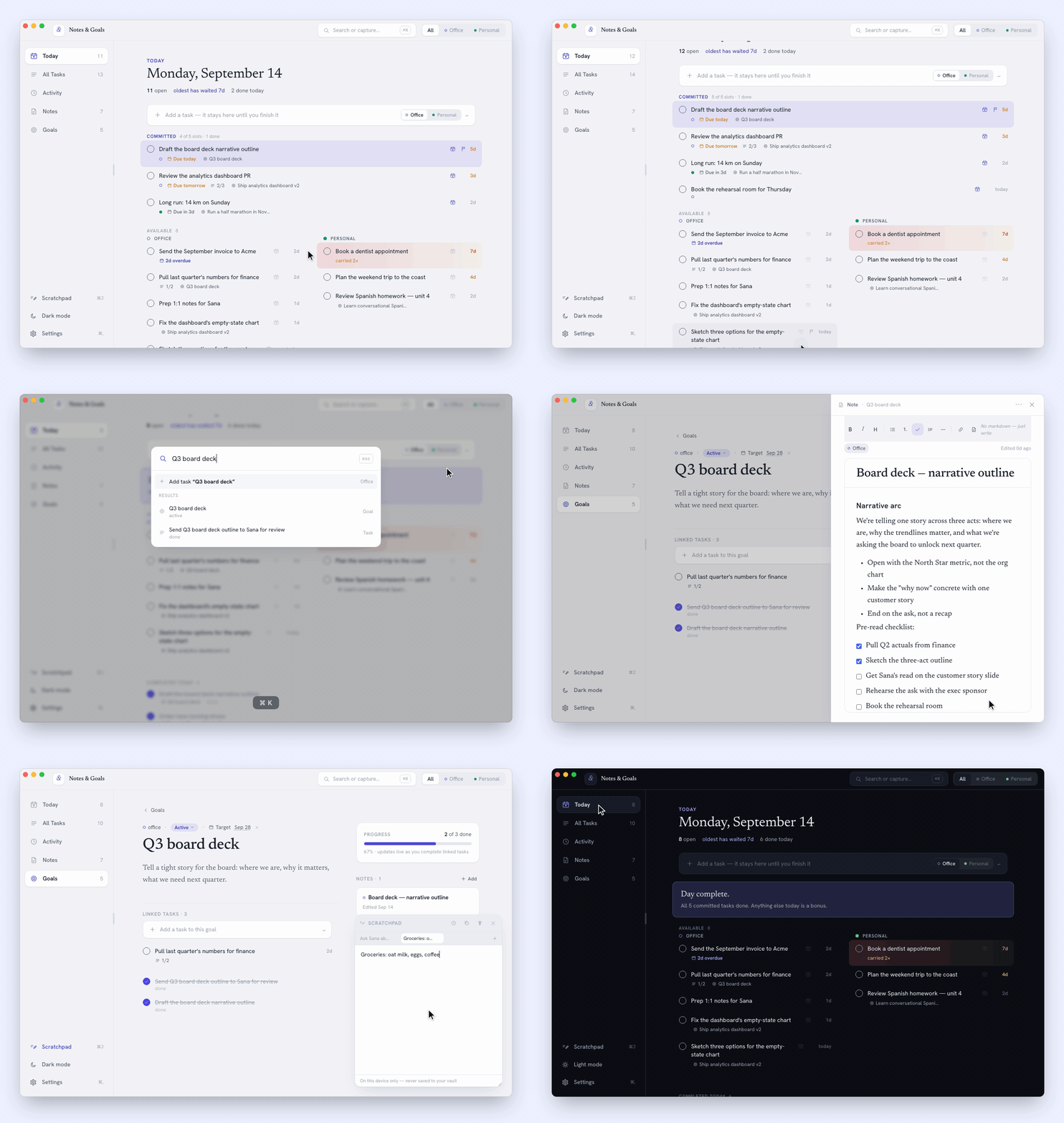
A short tour of Notes & Goals: adding a task and finishing today's slate, jumping to a goal with ⌘K and editing its note, jotting in the ⌘J scratchpad, and switching to dark mode.
Plan the day, find anything with ⌘K, and jot a thought in the ⌘J scratchpad.
  • No account
  • No cloud
  • No telemetry
  • Markdown & JSON files
  • MIT licensed

The idea

The task is the source of truth.

Most task apps make you rebuild today from yesterday. Notes & Goals has no daily page at all — Today is a live view of every task you haven't finished.

Mark something done or dropped and it's gone. Leave it open and it keeps showing up, quietly getting older, until you deal with it. Carry-forward is automatic; there's no migration step, ever.

Some days need more than a queue. Commit up to five tasks to today's slate, office and personal mixed as you like, and finish them. That's the day's only finish line — no points, no streaks, no penalties.

What's inside

Plan it, write it, finish it.

A slate for the tasks that matter today, a real editor for the thinking around them, and goals that keep score for you.

Today

Give the day a finish line.

Commit up to five tasks to today's slate. Finish them all and the day is complete — then close the laptop.

  • Open tasks carry forward on their own and show their age.
  • Priority flags, due dates, snooze, and subtasks.
  • A slide-in detail panel for everything else.
Today: the day's slate of committed tasks above the open tasks for Office and Personal.

Scratchpad ⌘J

Get it out of your head, then get back to work.

A floating brain-dump pad that opens over whatever you're doing. Drag it anywhere, resize it, and keep separate scraps in tabs.

  • ⌘T for a new tab, ⌘1–⌘9 to jump between them.
  • Insert the time, copy a tab, or clear it in one click.
  • Stays on this Mac — never written to your data folder.
The Scratchpad floating over Today, with several tabs of brain-dump notes.

Notes

Write in a real editor. Keep plain Markdown.

Headings, lists, checklists, quotes and dividers as you type — saved as a .md file any editor can open.

  • Notebooks for Office and Personal, with drag-and-drop filing.
  • Links open in your browser on ⌘-click.
  • Smart punctuation: -- becomes —, ... becomes ….
Notes: notebooks, a list of notes, and a note open in the editor with a heading, a checklist and a quote.
  • A goal page with its progress, linked tasks and notes.

    Goals

    Longer-term aims whose progress comes from the tasks you link. Nothing to update by hand.

  • The ⌘K palette finding a task, a goal and a line inside a note.

    Search ⌘K

    Find tasks, goals, notebooks and words inside notes, then jump straight there.

  • Activity: the tasks created and completed on a chosen day.

    Activity

    Look back at what you created and finished on any day. No journaling required.

  • Office / Personal filter on every view
  • Light and dark themes
  • Settings ⌘, to change or reveal your data folder

Your data

Same note. Two views.

Everything you write lands in a folder you choose, as files you can read without the app — Markdown for notes, JSON for tasks and goals. Point at a line on either side to find its twin.

Notes & Goals In the app
Personal Training Run a half marathon in November

Half marathon training plan

Weeks 9–12

Base is solid — now it's about the long run.

  • Tue: easy 6 km + strides
  • Thu: tempo 8 km
  • Book physio for the shin niggle
  • Sun: long run, 18 km
Don't chase race pace before mile 15.
notes/5f0c2a9e-7d41-4b8e-9a3c-2e6f1d8b4c07.md On disk
---id: 5f0c2a9e-7d41-4b8e-9a3c-2e6f1d8b4c07title: Half marathon training plancontext: personalgoalId: 8d2a4e1b-3c5f-4a7d-b9e0-6f1c2d3a4b5enotebookId: 51c09f3e-2b8a-4d6c-a1e7-9f0b3c4d5e6acreated: 2026-07-06T08:12:31Zupdated: 2026-09-12T19:40:05Zattachments: []---## Weeks 9–12 Base is solid — now it's about the long run. - Tue: easy 6 km + strides- Thu: tempo 8 km - [x] Book physio for the shin niggle- [ ] Sun: long run, 18 km > Don't chase race pace before mile 15.
Notes & Goals/
├─ tasks/<id>.json      one file per task
├─ notes/<id>.md        frontmatter + Markdown
├─ goals/<id>.json      one file per goal
├─ notebooks/<id>.json  one file per notebook
└─ .atlas/trash/        deleted, never destroyed
  • Sync it your way. Put the folder in iCloud Drive, Dropbox or a git repo.
  • Sync with Dropbox and your phone. Your files stay in your own Dropbox, and the phone app reads them from there.
  • Deletes are recoverable. Removed items move to a trash folder inside it.
  • Leave any time. Deleting the app never touches your data folder.

Install

Four steps and you're working.

  1. Download the .dmg

    One universal build that runs natively on Apple Silicon and Intel Macs.

  2. Drag to Applications

    Open the disk image and drag Notes & Goals.app into Applications.

  3. Open it

    Double-click the app. macOS asks once whether to open an app downloaded from the internet — click Open.

  4. Choose a data folder

    Pick where your tasks, notes and goals live. Change it later in Settings ⌘,.

On your phone

Install it from the browser. No App Store.

The phone app is the same Notes & Goals, made for a small screen. Add it to your Home Screen and it opens full screen like any other app, then syncs with your Dropbox.

iPhone

  1. Open qriousguy.com/notes-goals-app/app in Safari.
  2. Tap Share, then Add to Home Screen.
  3. Open it from your Home Screen and connect Dropbox.

Android

  1. Open the same address in Chrome.
  2. Tap the ⋮ menu, then Install app (or Add to Home screen).
  3. Open it from your apps and connect Dropbox.

Scan with your phone's camera to open it there.

No Dropbox account yet? Choose the free Dropbox Basic plan when you sign up: 2 GB of space and no payment needed. Tasks and notes are small text files, so that goes a long way.

It's your Dropbox, not ours. Your notes travel straight between your devices and the Apps/Notes & Goals folder in your own Dropbox. There's no Notes & Goals server in between, so we never see, store or hold any of your data.

FAQ

Before you download.

Is it really free?

Yes. Notes & Goals is MIT-licensed open source — no paid tier, no trial, and no account.

Can I use it on more than one Mac?

Put your data folder in iCloud Drive, Dropbox or a git repo and choose it on each Mac. The app picks up changes when you switch back to its window. It doesn't merge edits itself, so avoid changing the same item on two Macs at once.

Where does the scratchpad keep its text?

On that Mac only, inside the app — never in your data folder. It's for scraps in flight, so it doesn't sync.

What happens to my data if I stop using it?

Nothing. Tasks and goals are JSON files and notes are Markdown, all in your folder. Open them in any editor, or point another tool at them.

Do I have to pay for Dropbox?

No. Sync works with the free Dropbox Basic plan: pick it when you sign up and you get 2 GB without paying anything. Tasks and notes are small text files, so it goes a long way. Sync is optional too; the Mac app works fully without it.

Is there an iPhone, Android or Windows version?

Yes for phones: the phone app installs from the browser on iPhone and Android and syncs with your own Dropbox. There's no Windows version yet; the source is on GitHub if you'd like to follow along.

Give your day a finish line.

Free, open source, and your files stay yours.

Build it yourself

Tauri 2 and React on top, Rust underneath owning every file write. Needs Rust, Node 18+ and the Xcode Command Line Tools.

$ git clone https://github.com/Ashishjain608/notes-goals-app.git
$ cd notes-goals-app && npm install
$ npm run tauri:dev